Dynamic Island for Windows
Apple only puts the Dynamic Island on iPhones. Notchzy brings it to your Windows 10 or Windows 11 PC.
The Dynamic Island is the black pill at the top of newer iPhones that grows to show what's going on, like a song playing or a timer, and then shrinks back. Windows has nothing like it built in. Notchzy is an app that adds a Dynamic Island to Windows: a small pill at the top center of your screen that opens when something needs you and tucks away when it doesn't.
What the Windows Dynamic Island does
- Music controls for Spotify, music and video in your browser, and any player in Windows' media controls: cover art, play/pause, skip, seek, shuffle and repeat.
- Focus timer with 15, 25 or 45 minute sessions (or your own), a countdown ring in the pill and Pomodoro breaks.
- Notifications from Windows show up in the island, then it shrinks back.
- Charging animation when you plug in or unplug your laptop.
- Clipboard history with the texts, links and images you copied, plus search and filters; pin the ones you reuse.
- File tray: drop files on the island and drag them out later.
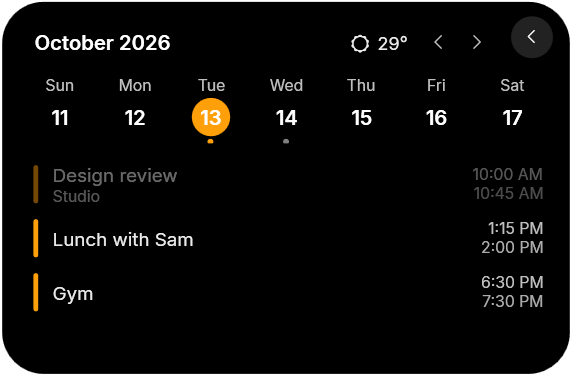
- Calendar and weather: a week strip with the day's events, a "Next" line under the clock and the weather for your city.
- Quick controls for Wi-Fi, Bluetooth, dark mode and volume, plus lock, sleep, restart and shut down.
- PC stats: CPU, GPU and RAM rings, the apps using the most memory, network, disk space and a speed test.
- To-dos: a quick checklist that's always one hover away.
- App launcher: every app from your Start menu in one grid, with search.
- Wallpaper picker: browse your wallpapers as previews and click one to set it.
- Claude Code progress for coders: Claude's tasks on the pill, and a nudge when it's done or needs you.
- Dark and light themes with an accent color of your choice.
- Stays out of the way: hides in full-screen games and videos, and shrinks to a slim bar over browser tabs.
How to get the Dynamic Island on Windows
- Buy and download Notchzy from notchzy.com. It's a one-time purchase of $9.99.
- Run the installer. Notchzy installs and starts on its own.
- Look at the top of your screen. The island appears at the top center, showing the time.
- Play some music or hover over it. The island opens with your song, cover art and controls.
- Make it yours from the tray icon → Settings: size, position, monitor, theme, accent color and which features are on.
Does it work on Windows 10?
Yes. Notchzy runs on Windows 11 and on Windows 10 version 2004 or newer, on desktops and laptops. It updates itself when a new version comes out.
Questions
Is there an official Dynamic Island for Windows?
No. Microsoft hasn't added a Dynamic Island to Windows, and Apple's is only on iPhone. Notchzy is an app that adds one to Windows 10 and 11.
Will the Dynamic Island cover my browser tabs or games?
No. Over a web browser it shrinks to a thin bar so your tabs stay clickable, and it hides completely while a game or video is full screen.
Does it work with Spotify and YouTube?
Yes. It works with Spotify, music and video in your browser, and any player that shows up in Windows' own media controls.
One-time purchase, updates included · Windows 10 and 11 · 14-day refund