A notch for Windows
MacBooks have a notch at the top of the screen. Notchzy gives your Windows PC one too, and makes it useful.
On a MacBook the notch is a cut-out for the camera, and Mac apps turn it into a little hub for music and files. Windows laptops don't have a notch, so there's nothing to build on. Notchzy adds a notch to Windows anyway: a black pill at the top center of your screen that looks like a MacBook notch at rest and opens up like the iPhone's Dynamic Island when you hover over it.
What you can do with the notch
- Music controls for Spotify, music and video in your browser, and any player in Windows' media controls: cover art, play/pause, skip, seek, shuffle and repeat.
- Focus timer with 15, 25 or 45 minute sessions (or your own), a countdown ring in the pill and Pomodoro breaks.
- Notifications from Windows show up in the island, then it shrinks back.
- Charging animation when you plug in or unplug your laptop.
- Clipboard history with the texts, links and images you copied, plus search and filters; pin the ones you reuse.
- File tray: drop files on the island and drag them out later.
- Calendar and weather: a week strip with the day's events, a "Next" line under the clock and the weather for your city.
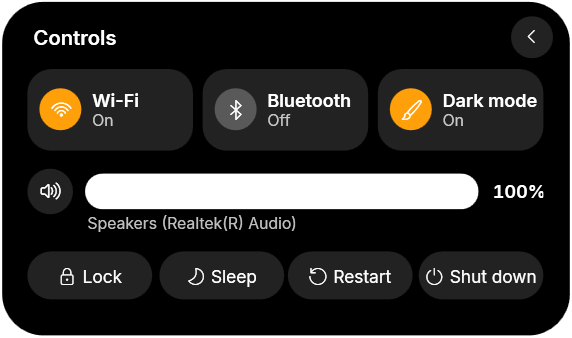
- Quick controls for Wi-Fi, Bluetooth, dark mode and volume, plus lock, sleep, restart and shut down.
- PC stats: CPU, GPU and RAM rings, the apps using the most memory, network, disk space and a speed test.
- To-dos: a quick checklist that's always one hover away.
- App launcher: every app from your Start menu in one grid, with search.
- Wallpaper picker: browse your wallpapers as previews and click one to set it.
- Claude Code progress for coders: Claude's tasks on the pill, and a nudge when it's done or needs you.
- Dark and light themes with an accent color of your choice.
- Stays out of the way: hides in full-screen games and videos, and shrinks to a slim bar over browser tabs.
Notch or Dynamic Island: which look do you get?
Both. At rest, Notchzy is a small notch at the top of your screen showing the time, or your album art and a moving equalizer while music plays. When you hover, get a notification or plug in your charger, it grows into a Dynamic Island-style card. You can change its size, its distance from the top edge and which monitor it's on.
Get the notch on your PC
- Buy and download Notchzy from notchzy.com ($9.99, one time).
- Run the installer. The notch appears at the top of your screen.
- Open Settings from the tray icon to set its size, position, theme and features.
Questions
Can you add a notch to a Windows laptop?
Yes. Your screen doesn't need a real notch. Notchzy draws one at the top center of the screen on any Windows 10 or 11 PC or laptop.
Is there a Mac notch app like NotchNook for Windows?
NotchNook is Mac-only. Notchzy gives Windows the same kind of notch, with music controls, a calendar, quick controls, PC stats, clipboard history, a file tray and a focus timer.
Does the notch work with multiple monitors?
Yes. You can choose which monitor the notch sits on in Settings.
One-time purchase, updates included · Windows 10 and 11 · 14-day refund