The Notchify alternative for Windows
Want a Dynamic Island on Windows that feels calmer and more Apple-like than Notchify? Try Notchzy.
We make Notchzy, so we're not neutral, but we've tried to be fair. Details about other apps were checked in November 2026 and can change: check each app's own page before you install it.
Notchify is a feature-packed island on the Microsoft Store. Some people want the opposite: fewer widgets, a cleaner look and the things they use every day one hover away. That's what Notchzy is for.
Why people switch to Notchzy
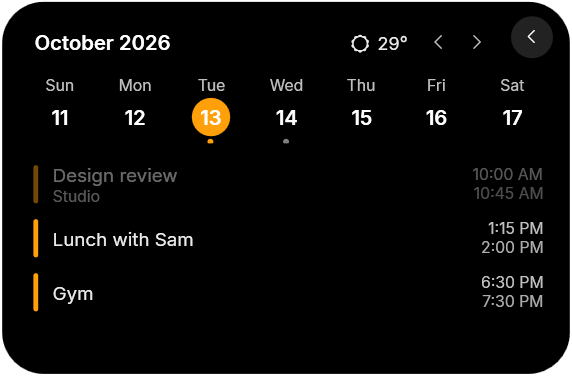
- Built around your day: music, a Pomodoro focus timer, a week calendar with weather and to-dos in one card.
- Looks like Apple made it: Apple-style font, colors, switches and spring animations.
- Never covers your tabs: shrinks to a slim bar over a web browser and hides in full-screen games.
- One price, 2 PCs: $9.99 once, with a 14-day refund.
What you get with Notchzy
- Music controls for Spotify, browser audio and video, and any player in Windows' media controls: cover art, play/pause, skip, seek, shuffle and repeat.
- Synced lyrics that follow the song, karaoke-style. Click a line to jump there.
- Copy text from screen: snip any part of the screen and its words are copied, read offline on your PC.
- Microphone and camera dot: orange or green on the pill while an app uses them, like on iPhone.
- Sound: switch between speakers and headphones, and set each app's own volume.
- Focus timer with Pomodoro breaks and a countdown ring in the pill.
- Notifications from Windows pop into the island.
- Clipboard history with texts, links and images, search and pins.
- File tray: drop files on the island, drag them out later.
- Calendar and weather: a week strip, today's events and your city's weather.
- Quick controls: Wi-Fi, Bluetooth, dark mode, volume, lock, sleep, restart, shut down.
- PC stats: CPU, GPU and RAM rings, top apps by memory, network, disk and a speed test.
- To-dos, app launcher and wallpaper picker, one hover away.
- Charging animation when you plug in or unplug a laptop.
- Stays out of the way: hides in full-screen games and videos, shrinks to a slim bar over browser tabs.
How to switch
- Close or uninstall Notchify so two islands don't sit on top of each other.
- Get Notchzy from notchzy.com for $9.99 once (2 PCs, 14-day refund).
- Run the installer and enter your license key. The island appears at the top of the screen.
- Make it yours from the tray icon → Settings: size, position, monitor, theme, accent color and which features are on.
Notchify is a trademark of its owner. Notchzy isn't affiliated with or endorsed by them.
Windows 10 and 11 · One-time, for 2 PCs · 14-day refund
Questions
What is the best Notchify alternative?
Notchzy is a Dynamic Island for Windows 10 and 11 with music controls, a focus timer, calendar and weather, to-dos, clipboard history, a file tray and PC stats, in an Apple-style design. It costs $9.99 once.
Can I run Notchzy and Notchify together?
You can, but both sit at the top of the screen, so it's best to close one. Notchzy can also be moved left or right in Settings.
Is there a free Notchify alternative?
Free options include Dynamic Edge, DynamicWin and Island's free tier. Notchzy is paid but comes with a 14-day refund.